

Description
8comic Manga Download Tool
Overview
The 8comic Downloader Tool is a specialized utility designed to streamline the process of downloading manga chapters from 8comic.com. It enables users to generate direct download links for all pages of a manga series, which can then be fed into the aria2 download manager for efficient, batch processing. This tool is particularly useful for collectors, fans, and archivists who want to preserve or organize manga content offline.
By automating the extraction of image URLs from the website’s reading interface, the tool eliminates the need for manual navigation and page-by-page downloading. It supports flexible selection options, including downloading all chapters, only the newest ones, or a specific range, offering users control over their download scope. The tool integrates directly with the aria2 RPC server, allowing for seamless and rapid downloads across multiple platforms.
Designed for users familiar with command-line tools and automation workflows, it caters to both casual fans and advanced users seeking efficiency. The developer, Toki Kanno, has maintained the tool since 2011, with consistent updates addressing compatibility issues and evolving website structures. While no official documentation is provided beyond the usage instructions, the tool remains functional and relevant for its target audience.
Key Features & Capabilities
- Automatic Link Generation – Extracts all image URLs from a manga’s reading page, creating a ready-to-use download list for aria2 or curl.
- aria2 RPC Integration – Communicates directly with a running aria2 RPC server, enabling instant initiation of downloads with a single click.
- Flexible Download Selection – Offers multiple options: download all chapters, the latest X chapters, or a custom range from chapter X to Y.
- Download List Export – Generates downloadable lists compatible with aria2 (-i flag) and curl (-K flag) for offline or alternative download setups.
- Multi-Platform Support – Works on Windows, Mac, and Linux systems, ensuring broad accessibility for users across different operating environments.
- Compatibility Updates – Regularly updated to adapt to changes in 8comic.com’s URL structure and page formatting, maintaining functionality over time.
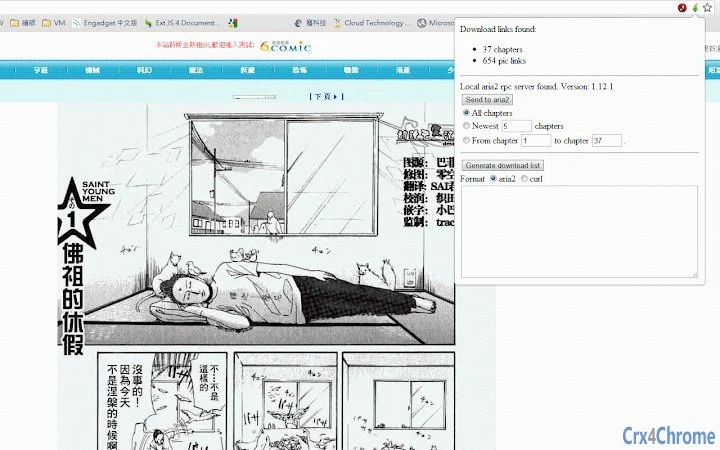
For example, a user reading a manga on the 8comic website can simply click the green arrow icon in the browser’s address bar to trigger the tool. If the aria2 RPC server is active, the tool sends the full list of page URLs to the download manager. Alternatively, users without a running server can generate a list and manually execute it via command line.
The tool’s efficiency lies in reducing repetitive tasks and minimizing human error during large-scale downloads. It’s ideal for users who maintain personal manga libraries or require full offline access for long-term reading.
User Interface, Workflow & Performance
The tool operates as a browser extension, with a minimal user interface that integrates into the Chrome browser. Upon visiting a manga reading page, a green arrow icon appears in the address bar—indicating the tool is active and ready to use. Clicking this icon opens a small popup window with download options and a generated list of URLs.
Navigating the tool is straightforward: users select their preferred download range and either send the list to aria2 or copy the text for external use. The workflow is designed to be intuitive, requiring no complex setup beyond launching the aria2 RPC server.
Performance is dependent on the user’s system and network conditions. The tool itself is lightweight, with a file size of 1.2 MB, and does not impose significant CPU or memory overhead during operation. The developer did not specify resource usage details, but based on its function, it operates efficiently without impacting browser performance.
Stability is maintained through consistent updates, with the latest version (0.26) released in 2014, addressing URL parsing issues and compatibility with updated website formats. The tool has remained functional over years, indicating reliable core behavior.
Compatibility & System Requirements
The software is compatible with Windows, Mac, and Linux operating systems, making it accessible to a wide range of users. It functions as a Chrome browser extension, requiring a modern version of Chrome to operate properly.
Installation size is 1.2 MB, which is minimal and suitable for systems with limited storage. The tool requires the aria2 download manager (version 1.13.0 or higher) to be installed and running with RPC enabled. The developer did not specify exact system requirements beyond the OS and browser compatibility.
Performance and stability depend on the user’s environment, particularly the availability and configuration of the aria2 RPC server. The tool does not include built-in download functionality but relies on external tools for execution. Compatibility with newer versions of Chrome and aria2 is assumed, though no explicit version requirements are listed.
Pros and Cons
Pros
- Efficiently generates complete download lists for manga pages
- Direct integration with aria2 for fast batch downloads
- Flexible download range options: all, newest, or custom chapter range
- Supports multiple platforms: Windows, Mac, Linux
- Free to use with no licensing restrictions
- Regular updates maintain compatibility with 8comic.com’s evolving site structure
Cons
- Requires external setup of aria2 RPC server for full functionality
- No built-in download manager—relies on user-configured tools
- Minimal documentation beyond basic usage instructions
- Only works with 8comic.com and not other manga platforms
- Latest update was in 2014; no recent development activity visible
FAQ Section
Is the 8comic Downloader Tool free to use?
Yes, the tool is completely free. There are no subscription fees, in-app purchases, or hidden costs.
What operating systems does it support?
The tool supports Windows, Mac, and Linux systems. It operates as a Chrome extension and requires a compatible browser to function.
Do I need to install aria2 to use this tool?
Yes, aria2 must be installed and running with RPC enabled. The tool generates download lists but does not execute downloads itself.
Can I use this tool without an internet connection?
Yes, once the download list is generated and saved, you can use it offline with aria2 or curl. However, the tool itself requires an active internet connection to access 8comic.com and extract URLs.
Is the tool safe to use?
The tool does not collect personal data or modify system files. It only interacts with the browser and the 8comic website. For full safety, users should review the privacy policy at https://tokikanno.github.io/privacy-policy.html.
Final Thoughts
The 8comic Downloader Tool remains a highly effective solution for users seeking to download manga content from 8comic.com in bulk. Its ability to generate accurate download links and integrate with aria2 makes it a valuable asset for fans and archivists. While it requires some technical setup, the workflow is logical and well-optimized for its niche purpose.
Despite being last updated in 2014, the tool continues to function reliably, thanks to consistent compatibility updates. It’s ideal for users comfortable with command-line tools and automation. For those who value efficiency, control, and offline access to manga, this tool delivers a powerful, lightweight solution.
Download 8comic Downloader Tool now
Guides & Tutorials for 8comic Link Generator Extension for Chrome
How to install 8comic Link Generator Extension for Chrome
- Click the Preview / Download button above.
- Once redirected, accept the terms and click Install.
- Wait for the 8comic Link Generator Extension for Chrome download to finish on your device.
How to use 8comic Link Generator Extension for Chrome
This software is primarily used for its core features described above. Open the app after installation to explore its capabilities.
User Reviews for 8comic Link Generator Extension for Chrome 0
No reviews found





